
Complete examples
Runnable local code using only the implemented library API.
A preferences application#
This complete script imports the official pinned v0.1.0 library, creates all stateful components and connects explicit configuration actions. The initial HTTPS import downloads executable code; the application performs no gameplay automation or Dashboard/telemetry operations.
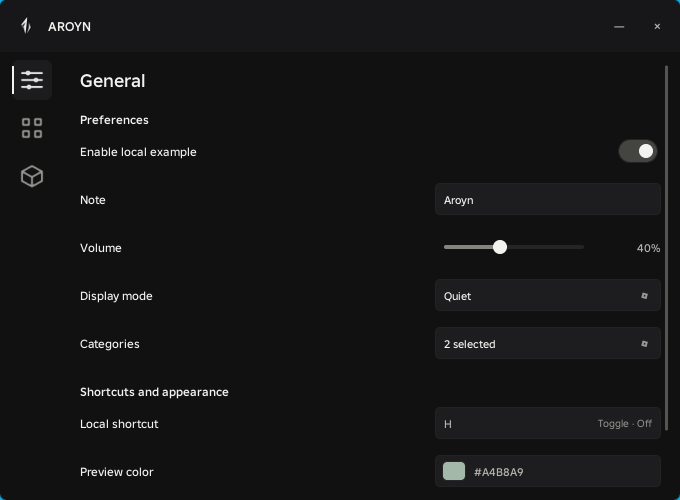 Open full size ↗
local Aroyn = loadstring(game:HttpGet(
"https://lib.aroyn.xyz/stable/0.1.0/Aroyn.lua"
))()
local parent = game:GetService("Players").LocalPlayer:WaitForChild("PlayerGui")
local window = Aroyn:CreateWindow({
Parent = parent, Id = "docs-complete", Title = "AROYN", Logo = Aroyn.Logo,
Config = {Namespace = "docs-example", AutoLoad = false, AutoSave = false},
})
local page = window:CreatePage({Name = "General", Icon = "components"})
local section = page:CreateSection({Title = "Preferences"})
local controls = {}
controls.Enabled = section:CreateToggle({Name = "Details", Flag = "details", Default = false})
controls.Note = section:CreateTextInput({Name = "Note", Flag = "note", Default = ""})
controls.Volume = section:CreateSlider({Name = "Volume", Flag = "volume",
Min = 0, Max = 100, Step = 5, Default = 40, Suffix = "%"})
controls.Mode = section:CreateDropdown({Name = "Mode", Flag = "mode",
Options = {"Quiet", "Detailed"}, Default = "Quiet"})
controls.Categories = section:CreateDropdown({Name = "Categories", Flag = "categories",
Multi = true, Options = {"Seeds", "Pets"}, Default = {"Pets"}})
controls.Key = section:CreateKeybind({Name = "Shortcut", Flag = "shortcut", Default = "H",
Mode = "Toggle", OnActivate = function(active) print("Shortcut:", active) end})
controls.Color = section:CreateColorPicker({Name = "Preview color", Flag = "color",
Default = Color3.fromRGB(164, 184, 169)})
local settings = window:CreatePage({Name = "Settings", Icon = "settings"})
local actions = settings:CreateSection({Title = "Local configuration"})
local function feedback(ok, info)
window:Notify({Title = ok and "Configuration updated" or "Configuration failed",
Description = info.Message, Type = ok and "Success" or "Error"})
end
actions:CreateButton({Name = "Save values", Text = "Save", Variant = "Primary",
Callback = function() feedback(window:SaveConfig("main")) end})
actions:CreateButton({Name = "Restore values silently", Text = "Load",
Callback = function() feedback(window:LoadConfig("main")) end})
actions:CreateButton({Name = "Reset current values", Text = "Reset", Callback = function()
window:Dialog({Type = "Confirm", Title = "Reset current preferences?",
Description = "Saved profiles remain unchanged.",
OnConfirm = function() feedback(window:ResetConfig()) end})
end})
actions:CreateButton({Name = "List profiles", Text = "List", Callback = function()
local ok, info = window:ListConfigs()
if ok then print(table.concat(info.Names, ", ")) else warn(info.Code, info.Message) end
end})
actions:CreateButton({Name = "Remove saved profile", Text = "Delete", Callback = function()
window:Dialog({Type = "Confirm", Title = "Delete main?",
OnConfirm = function() feedback(window:DeleteConfig("main")) end})
end})
-- Load once all flags exist. No ordinary or activation callbacks are replayed.
local ok, info = window:LoadConfig("main")
if not ok then warn(info.Code, info.Message) end
return window, controlsExisting project examples#
| Local file | Purpose |
|---|---|
| examples/basic.luau | Factory taking Aroyn and parent; returns a window. |
| examples/complete.luau | Full local API factory; returns window and controls. |
| examples/StandaloneDemo.luau | Existing bundled basic demo with its local asset adapter. |
| examples/CompleteDemo.luau | Existing bundled complete demo. |
local Aroyn = loadstring(game:HttpGet(
    "https://lib.aroyn.xyz/stable/0.1.0/Aroyn.lua"
))()
local Example = assert(loadstring(readfile("aroyn-ui-lab/examples/complete.luau")))()
local window, controls = Example(Aroyn,
game:GetService("Players").LocalPlayer:WaitForChild("PlayerGui"))Availability#
The distribution workspace includes examples/minimal.luau, examples/showcase.luau and examples/showcase.factory.luau. The full showcase has General, Feedback and Configurations pages, every control, notifications, dialogs, explicit Save/Load/List/Delete/Reset, opt-in AutoSave and cleanup. The same factory works with the approved core or standalone artifact. The documentation site does not serve executor bundles; the approved v0.1.0 artifact is served independently at lib.aroyn.xyz, as described in Installation.
Version-pinned installation#
The examples above use the verified immutable v0.1.0 import. Prefer it for predictable dependencies; Latest may change with a future approved Stable release.