
Aroyn UI
A native Luau interface library for controls, overlays and local preferences.
Build the interface. Keep your runtime separate.
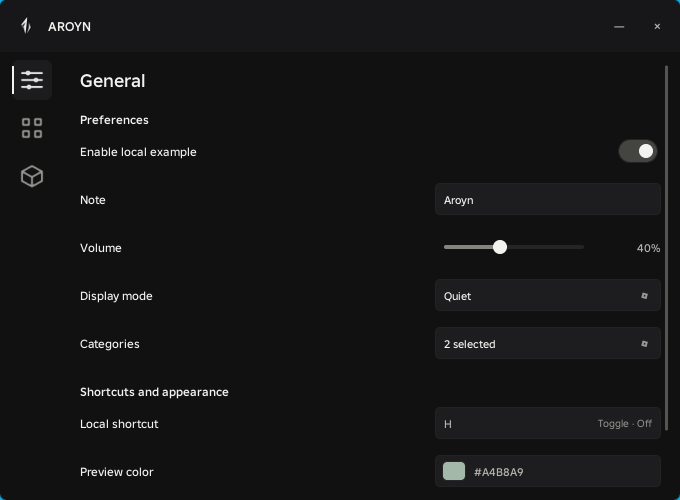
Aroyn UI provides a custom Roblox interface: a compact navigation rail, persistent pages, typed controls, notifications, dialogs and named configurations. It renders with native Roblox UI objects. Game logic stays in your controllers; the library does not run gameplay automation or make network requests.
 Open full size ↗
What you can build#
The library and the hub#
Aroyn Hub is the game-specific application. Aroyn UI is its reusable interface foundation. The Hub’s public client loader, dashboard authentication and telemetry are separate systems; they are not installation methods or features of this library.
Verified environment#
| Environment | Status | Meaning |
|---|---|---|
| Potassium · PC | User approved | Phase 5B reported 11 PASS, 0 FAIL and 1 cleanup SKIP. The user subsequently approved interactions and separate-run persistence. |
| Other executors | Not verified | Capabilities and asset support can differ. Check your executor before integration. |
| Mobile / touch | Not verified | The core includes touch handling, but desktop approval does not establish mobile compatibility. CreateWindow has a 440px minimum width. |
| Roblox Studio | Documented local path | The core can be placed in a ModuleScript. This path has not been verified in a real Studio runtime here. |
Start with the public library#
Aroyn UI v0.1.0 is published as an independent Stable library with embedded images and checksums. Start with the pinned public installation guide; an optional local-file workflow remains available. The library performs no gameplay automation or Dashboard authentication.